<!DOCTYPE html>
	<html lang="vi" xmlns="http://www.w3.org/1999/xhtml" prefix="og: http://ogp.me/ns#">
	<head>
<title>Phần mềm sao lưu Mega Backup</title>
<meta name="description" content="Phần mềm sao lưu Mega Backup - Savefile - Tin Tức - https&#x3A;&#x002F;&#x002F;phanmemthienha.com&#x002F;news&#x002F;savefile&#x002F;huong-dan-phan-mem&#x002F;phan-mem-sao-luu-mega-backup-137.html">
<meta name="author" content="PHAN MEM THIEN HA">
<meta name="copyright" content="PHAN MEM THIEN HA [phamhuy842005@gmail.com]">
<meta name="robots" content="index, archive, follow, noodp">
<meta name="googlebot" content="index,archive,follow,noodp">
<meta name="msnbot" content="all,index,follow">
<meta name="generator" content="NukeViet v4.0">
<meta name="viewport" content="width=device-width, initial-scale=1">
<meta http-equiv="Content-Type" content="text/html; charset=utf-8">
<meta property="og:title" content="Phần mềm sao lưu Mega Backup">
<meta property="og:type" content="website">
<meta property="og:description" content="Savefile - Tin Tức - https&#x3A;&#x002F;&#x002F;phanmemthienha.com&#x002F;news&#x002F;savefile&#x002F;huong-dan-phan-mem&#x002F;phan-mem-sao-luu-mega-backup-137.html">
<meta property="og:site_name" content="PHAN MEM THIEN HA">
<meta property="og:url" content="https://phanmemthienha.com/news/huong-dan-phan-mem/phan-mem-sao-luu-mega-backup-137.html">
<link rel="shortcut icon" href="https://phanmemthienha.com/uploads/logo-shop-thien-ha-5.png">
<link rel="canonical" href="https://phanmemthienha.com/news/huong-dan-phan-mem/phan-mem-sao-luu-mega-backup-137.html">
<link rel="alternate" href="https://phanmemthienha.com/news/rss/" title="Tin Tức" type="application/rss+xml">
<link rel="alternate" href="https://phanmemthienha.com/news/rss/huong-dan-phan-mem/" title="Tin Tức - Hướng dẫn phần mềm" type="application/rss+xml">
<link rel="alternate" href="https://phanmemthienha.com/news/rss/huong-dan-noi-bo/" title="Tin Tức - Hướng dẫn nội bộ" type="application/rss+xml">
<link rel="alternate" href="https://phanmemthienha.com/news/rss/Doi-tac/" title="Tin Tức - Đối tác" type="application/rss+xml">
<link rel="alternate" href="https://phanmemthienha.com/news/rss/Tuyen-dung/" title="Tin Tức - Tuyển dụng" type="application/rss+xml">
<link rel="preload" as="script" href="https://phanmemthienha.com/assets/js/jquery/jquery.min.js">
<link rel="preload" as="script" href="https://phanmemthienha.com/assets/js/language/vi.js">
<link rel="preload" as="script" href="https://phanmemthienha.com/assets/js/global.js">
<link rel="preload" as="script" href="https://phanmemthienha.com/themes/default/js/news.js">
<link rel="preload" as="script" href="https://phanmemthienha.com/themes/popovleather/js/main.js">
<link rel="preload" as="script" href="https://phanmemthienha.com/themes/popovleather/js/bootstrap.min.js">
<link rel="StyleSheet" href="https://phanmemthienha.com/assets/css/font-awesome.min.css">
<link rel="StyleSheet" href="https://phanmemthienha.com/themes/popovleather/css/bootstrap.min.css">
<link rel="StyleSheet" href="https://phanmemthienha.com/themes/popovleather/css/style.css">
<link rel="StyleSheet" href="https://phanmemthienha.com/themes/popovleather/css/style.responsive.css">
<link rel="StyleSheet" href="https://phanmemthienha.com/themes/default/css/news.css">
<link rel="StyleSheet" href="https://phanmemthienha.com/assets/css/popovleather.vi.0.css?t=87">
<style>
	body{background: #fff;}
</style>
	</head>
	<body>
<div id="print">
	<div id="hd_print">
		<h2 class="pull-left">PHAN MEM THIEN HA</h2>
		<p class="pull-right"><a title="PHAN MEM THIEN HA" href="https://phanmemthienha.com/">https://phanmemthienha.com</a></p>
	</div>
	<div class="clear"></div>
	<hr />
	<div id="content">
		<h1>Phần mềm sao lưu Mega Backup</h1>
		<ul class="list-inline">
			<li>Thứ tư - 08/05/2019 11:37</li>
			<li class="hidden-print txtrequired"><em class="fa fa-print">&nbsp;</em><a title="In ra" href="javascript:;" onclick="window.print()">In ra</a></li>
			<li class="hidden-print txtrequired"><em class="fa fa-power-off">&nbsp;</em><a title="Đóng cửa sổ này" href="javascript:;" onclick="window.close()">Đóng cửa sổ này</a></li>
		</ul>
		<div class="clear"></div>
		<div id="hometext">
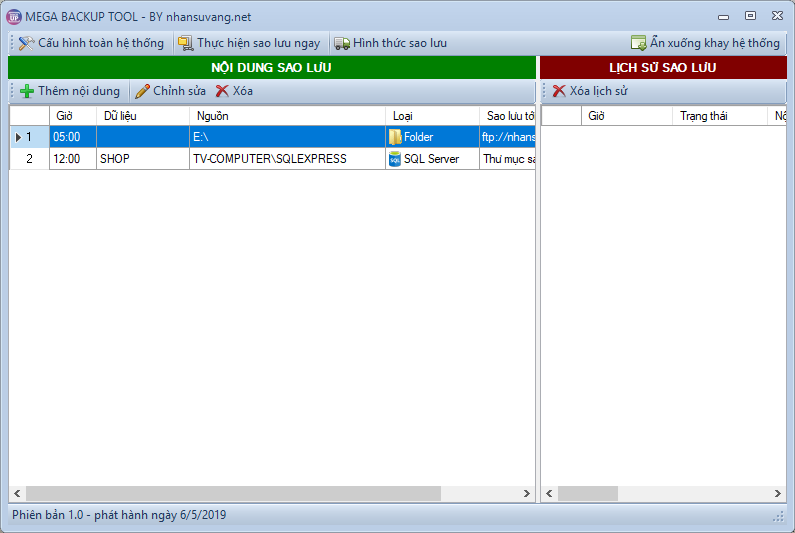
			Mega Backup là gì?Trong bối cảnh mã độc mã hóa tống tiền Ransomware hoành hành. Chúng tôi phát hành chương trình hỗ trợ bảo vệ bạn trước các cuộc tần công của Ransomware.
		</div>
				<div class="imghome">
			<img alt="MegaBackupFullScreen" src="https://phanmemthienha.com/uploads/news/2019_05/megabackupfullscreen.png" width="460" class="img-thumbnail" />
		</div>
		<div class="clear"></div>
		<div id="bodytext" class="clearfix">
			<h2>Chức năng có gì?</h2>

<p>Đúng như cái tên của nó, Mega Backup là công cụ sao lưu, hỗ trợ nhiều hình thức sao lưu.</p>

<p><strong>Phiên bản hiện tại cho phép bạn sao lưu từ:</strong></p>

<ul>
	<li>SQL Server</li>
	<li>Firebird</li>
	<li>File (excel, text, word…)</li>
	<li>Thư mục</li>
</ul>

<p><strong>Sao lưu tới</strong></p>

<ul>
	<li>Thư mục tại máy tính</li>
	<li>Thư mục tại máy tính với chế độ bảo vệ</li>
	<li>Gửi email với các file có nội dung nhỏ</li>
	<li>Google Drive</li>
	<li>Dropbox (phiên bản tiếp theo)</li>
	<li>One Drive (phiên bản tiếp theo)</li>
</ul>

<p><strong>Tự động sao lưu</strong></p>

<p>Hệ thống cho phép cấu hình 4 lần sao lưu/ngày cho từng nội dung</p>

<p><strong>Tối ưu và tự động phân thư mục khi sao lưu</strong></p>

<p>Hệ thống sẽ nén dữ liệu khi sao lưu, tự động phân ngày và giờ sao lưu đảm bảo bạn dễ dàng theo dõi lại nội dung đã sao lưu</p>

<p>Ngoài ra hệ thống sẽ gửi thông báo tới mail khi backup lỗi để bạn có hướng xử lý.</p>

<h2>Điểm khác biệt</h2>

<p>Mega Backup cho phép bạn sử dụng song song nhiều tài khoản ftp, google drive… do đó có thể tận dụng tối đa dung lượng free nếu kinh phí bạn hạn hẹp không thể mua.</p>

<p>Điểm đặc biệt, Mega Backup theo đúng nghĩa là sao lưu 1 chiều, nên hoàn toàn yên tâm dù máy bạn có lỡ bị Ransomware đi chăng nữa, dữ liệu trên google drive vẫn ok<br  />
Giới thiệu bằng video<br  />
https://www.youtube.com/watch?v=GBZkGpQdV9o<br  />
&nbsp;</p>

<h2>Link tải</h2>

<div class="wp-block-button my-button-style"><a class="wp-block-button__link has-text-color has-very-light-gray-color has-background has-vivid-red-background-color" href="https://drive.google.com/open?id=1cgha7AvrUO567Vz1msFy3teM9zS3hqJU" target="_blank">TẢI PHẦN MỀM</a></div>

<div class="wp-block-button my-button-style"><br  />
&nbsp;</div>

<h2>Hướng dẫn sử dụng</h2>

<p class="has-text-color has-medium-font-size has-vivid-red-color"><strong>1.Yêu cầu cài đặt</strong></p>

<p>Hệ thống chạy trên nền tảng .Net Framework 4.0. Do đó nếu máy bạn chưa cài đặt .Net 4, chạy phần mềm báo lỗi ngay khi mở hoặc lỗi khi xác thực google drive thì bạn tải và cài đặt .Net Framework 4.0 ở đây</p>

<div class="wp-block-button my-button-style"><a class="wp-block-button__link has-text-color has-very-light-gray-color has-background has-vivid-green-cyan-background-color" href="https://www.microsoft.com/en-us/download/details.aspx?id=17718">TẢI .NET FRAMEWORK 4.0</a></div>

<div class="wp-block-button my-button-style"><a class="wp-block-button__link has-text-color has-very-light-gray-color has-background has-luminous-vivid-orange-background-color" href="https://www.microsoft.com/en-us/download/details.aspx?id=3556">TẢI BẢN CẬP NHẬT NET FRAMEWORK 4.0</a></div>

<p class="has-text-color has-medium-font-size has-vivid-red-color"><strong>2. Hướng dẫn sử dụng</strong></p>

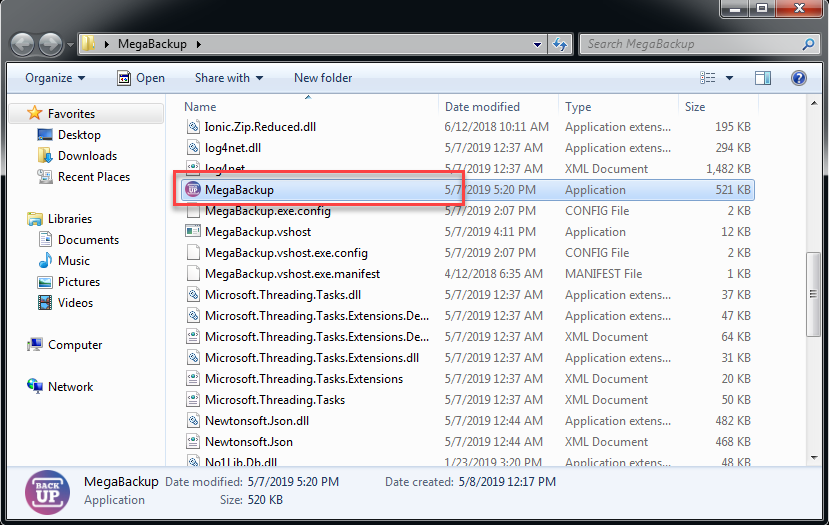
<p>Sau khi tải về theo link phía trên, bạn giải nén ra một thư mục nào đó. Sau đó chạy chương trình MegaBackup.exe ở trong thư mục</p>
<br  />
<img alt="Megabackup HuongDan01" src="https://phanmemthienha.com/uploads/news/2019_05/megabackup-huongdan01.png" />
<p><br  />
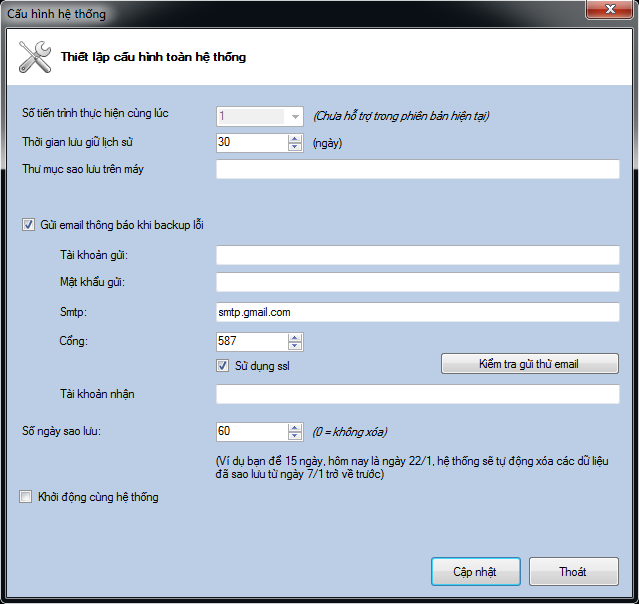
Lần đầu tiên chạy, hệ thống sẽ yêu cầu bạn thiết lập đường dẫn tới thư mục sẽ sử dụng để lưu dữ liệu backup cũng như các cầu hình khác<br  />
&nbsp;</p>
<br  />
<img alt="MegaBackup HuongDan03" src="https://phanmemthienha.com/uploads/news/2019_05/megabackup-huongdan03.png" width="639" />
<p><br  />
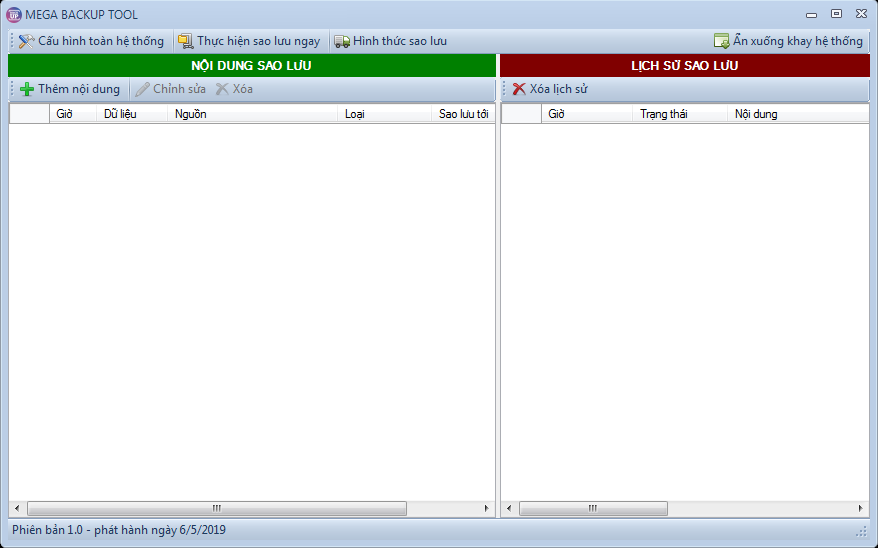
Bạn lựa chọn thư mục trên máy và bấm “Cập nhật”. Giao diện chính xuất hiện và thông báo sẽ tự ẩn 3 giây vào góc dưới vùng đồng hộ hệ thống.</p>

<p>Với tùy chọn khởi động cùng hệ thống, nếu hệ thống không chạy, bạn sử dụng Task Scheduler của Windows để set cho hệ thống tự khởi động khi bật máy.</p>

<p>Bạn nháy đúp vào biểu tượng để mở lại<br  />
&nbsp;</p>
<br  />
<img alt="Megabackup HuongDan04" height="548" src="https://phanmemthienha.com/uploads/news/2019_05/megabackup-huongdan04_1.png" width="878" />
<figcaption>&nbsp;</figcaption>

<p class="has-text-color has-medium-font-size has-vivid-cyan-blue-color"><br  />
<strong>Thiết lập hình thức sao lưu</strong></p>

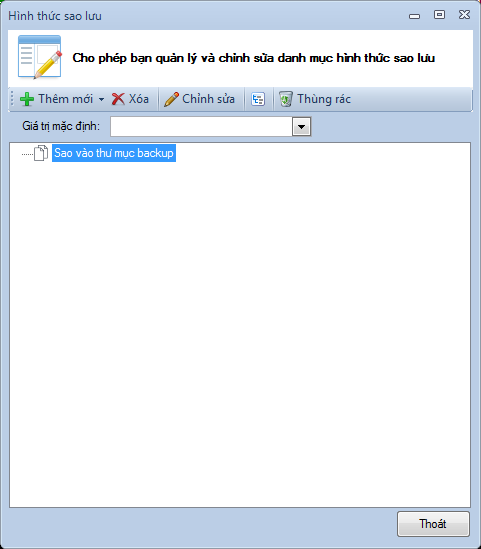
<p>Hình thức sao lưu chính là nơi lưu trữ file sao lưu. Bạn cần thiết lập các nơi lưu trữ trước khi tạo nội dung sao lưu. Bạn bấm vào nút “Hình thức sao lưu” ở trên thanh công cụ.<br  />
&nbsp;</p>
<br  />
<img alt="Megabackup HuongDan05" src="https://phanmemthienha.com/uploads/news/2019_05/megabackup-huongdan05.png" width="481" />
<p><br  />
Mặc định hệ thống thiết lập một hình thức sao lưu là sao lưu vào thư mục đã thiết lập trong cấu hình toàn hệ thống lúc ban đầu.</p>

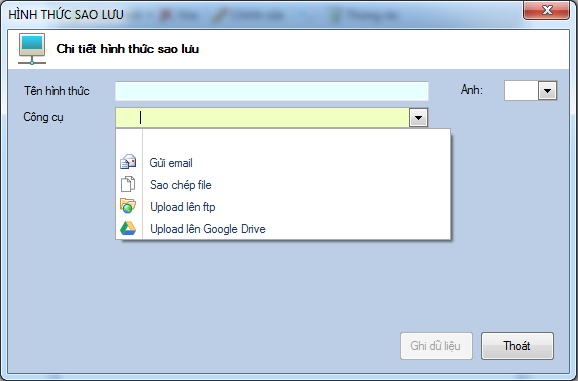
<p>Bạn thêm hình thức sao lưu bằng cách bấm nút Thêm mới<br  />
&nbsp;</p>
<br  />
<img alt="Megabackup HuongDan06 1" src="https://phanmemthienha.com/uploads/news/2019_05/megabackup-huongdan06-1.png" width="578" />
<p><br  />
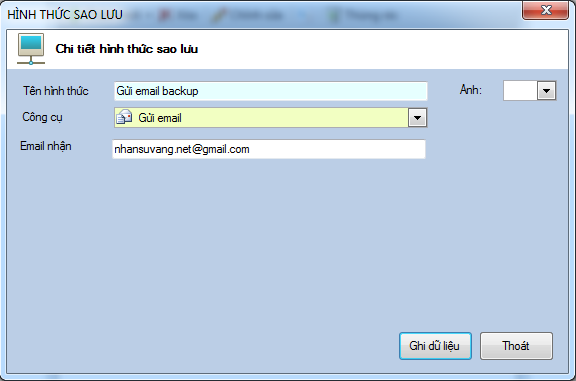
<strong>1 – Gửi email</strong><br  />
&nbsp;</p>
<br  />
<img alt="Megabackup HuongDan07" src="https://phanmemthienha.com/uploads/news/2019_05/megabackup-huongdan07.png" width="576" />
<p><br  />
Hệ thống sẽ sử dụng chung email thiết lập trong cấu hình để gửi thông báo lỗi để gửi mail sao lưu, do đó bạn cần thiết lập cấu hình này trước khi tạo hình thức sao lưu bằng email.</p>

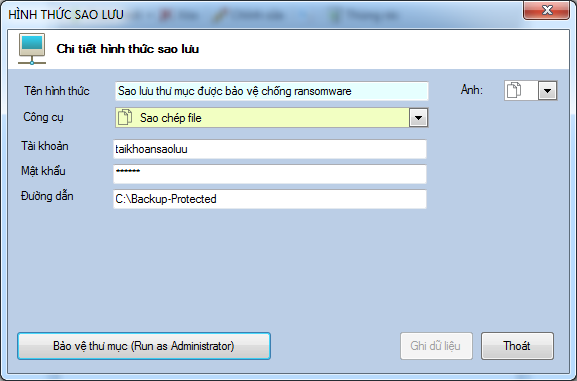
<p><strong>2 – Sao chép file</strong></p>

<p>Hệ thống sẽ sao chép ra 1 thư mục hoặc một máy tính khác.<br  />
&nbsp;</p>
<br  />
<img alt="Megabackup HuongDan09" src="https://phanmemthienha.com/uploads/news/2019_05/megabackup-huongdan09.png" width="577" />
<p><br  />
Chương trình cung cấp một chức năng bảo vệ thư mục với tài khoản và mật khẩu của windows để chống lại Ransomware, bạn click “Bảo vệ thư mục” để tạo thư mục mà chỉ phần mềm có thể truy cập.</p>

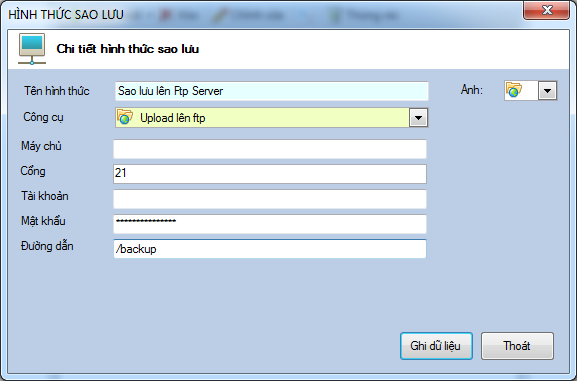
<p><strong>3 – Upload lên máy chủ ftp</strong><br  />
&nbsp;</p>
<br  />
<img alt="Megabackup HuongDan10" src="https://phanmemthienha.com/uploads/news/2019_05/megabackup-huongdan10_1.png" width="577" />
<p><br  />
Bạn thiết lập các thông số máy chủ ftp: server, cổng, tài khoản, mật khẩu</p>

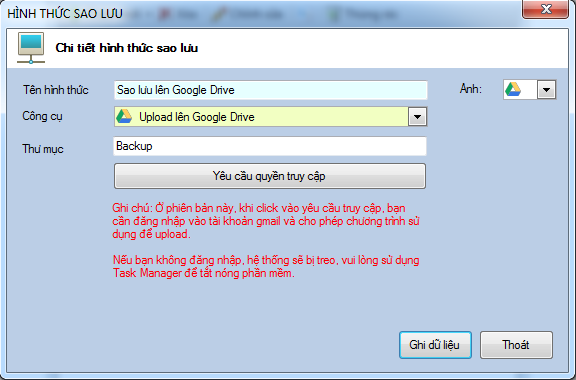
<p><strong>4 – Upload lên Google Drive</strong><br  />
&nbsp;</p>
<br  />
<img alt="Megabackup HuongDan11" src="https://phanmemthienha.com/uploads/news/2019_05/megabackup-huongdan11.png" width="576" />
<p><br  />
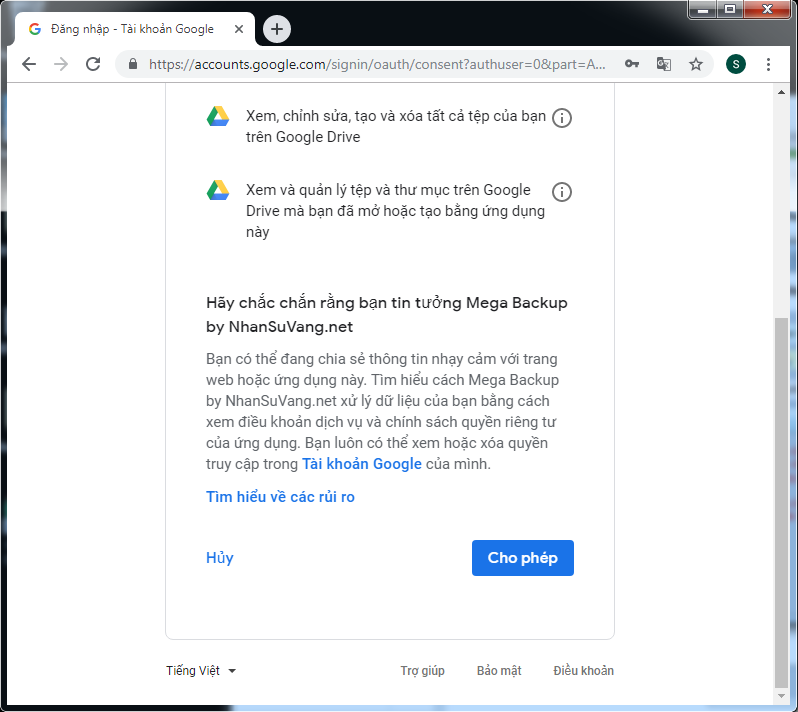
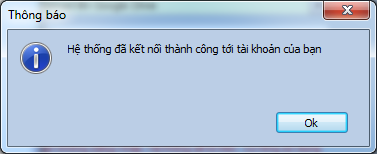
Bạn bấm Yêu cầu quyền truy cập để xác thực tài khoản google drive. Hệ thống sẽ mở trình duyệt để bạn đăng nhập và cho quyền.</p>

<p>Xin lưu ý như ghi chú đỏ ở hình trên, bạn cần đăng nhập vào tài khoản và cho phép, vì hệ thống sẽ treo và chờ cho tới khi bạn cho phép. Nếu bạn không cho phép, hãy tắt nóng phần mềm trong task manager<br  />
&nbsp;</p>
<br  />
<br  />
<img alt="Megabackup HuongDan12" src="https://phanmemthienha.com/uploads/news/2019_05/megabackup-huongdan12.png" width="798" /><img alt="Megabackup HuongDan13" src="https://phanmemthienha.com/uploads/news/2019_05/megabackup-huongdan13.png" width="377" />
<p><br  />
<strong>Thiết lập nội dung sẽ sao lưu</strong></p>

<p>Sau khi thiết lập hình thức sao lưu, bạn sẽ thiết lập các dữ liệu mà mình sẽ sao lưu.</p>

<p>Ở ngay giao diện chính, phía bên trái, bạn bấm nút “Thêm mới”<br  />
&nbsp;</p>
<br  />
<img alt="Megabackup HuongDan14" src="https://phanmemthienha.com/uploads/news/2019_05/megabackup-huongdan14.png" width="731" />
<p><br  />
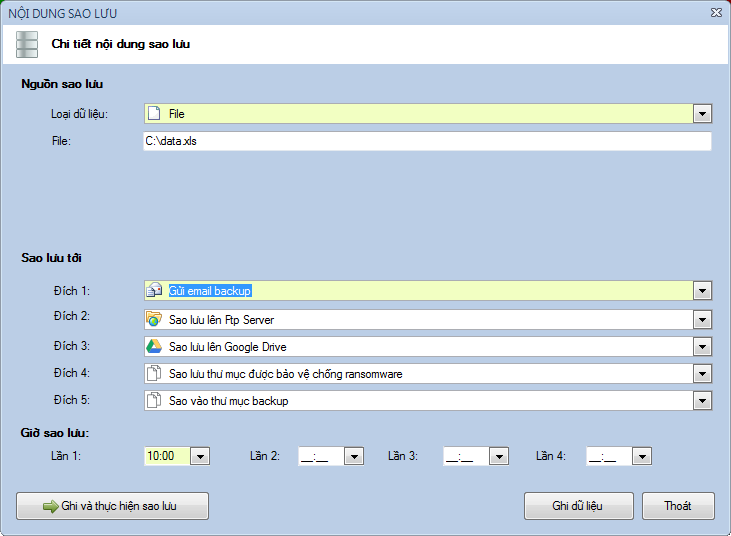
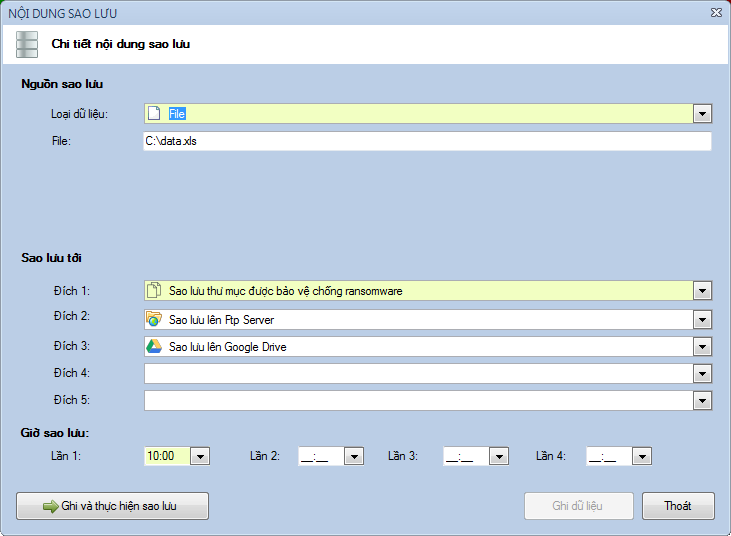
Hệ thống hỗ trợ 4 hình thức sao lưu chính:</p>

<p>1 – Sao chép File</p>

<p>2 – Sao chép Thư mục</p>

<p>Sao chép file và thư mục giống nhau, bạn chỉ cần cung cấp đường dẫn sao lưu<br  />
&nbsp;</p>
<br  />
<img alt="Megabackup HuongDan17" src="https://phanmemthienha.com/uploads/news/2019_05/megabackup-huongdan17.png" width="731" />
<p><br  />
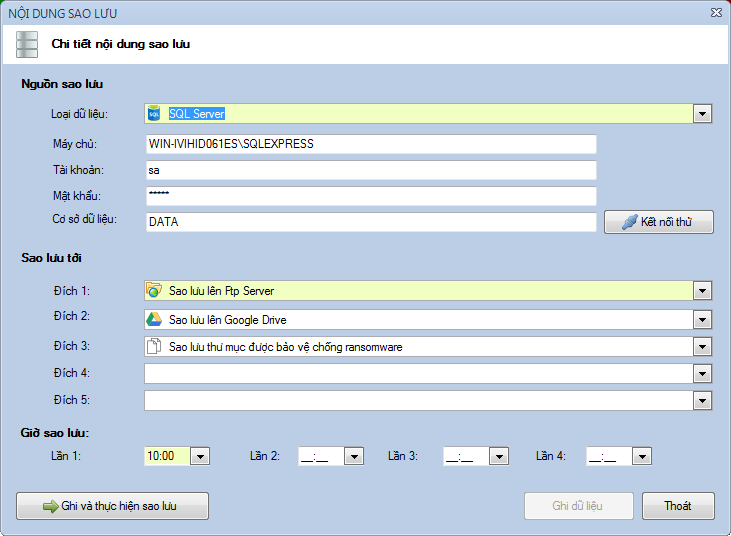
3 – Sao lưu từ Sql server<br  />
&nbsp;</p>
<br  />
<img alt="Megabackup HuongDan15" src="https://phanmemthienha.com/uploads/news/2019_05/megabackup-huongdan15.png" width="731" />
<p><br  />
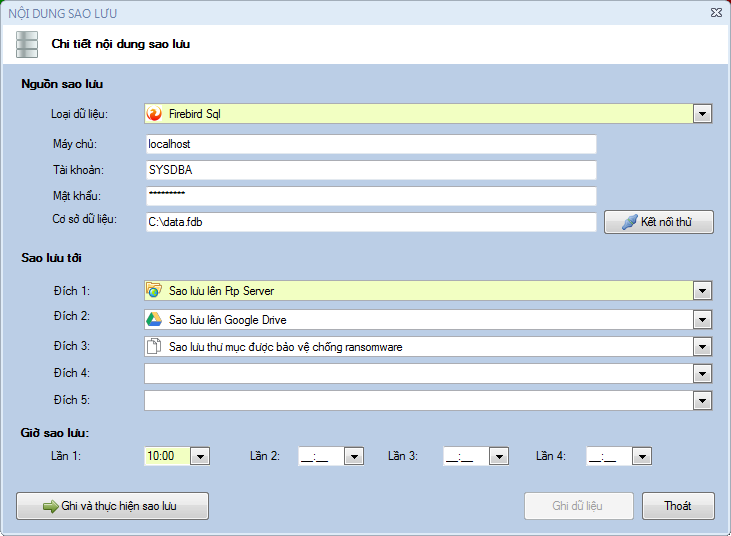
4 – Sao lưu từ Firebird<br  />
&nbsp;</p>
<br  />
<img alt="Megabackup HuongDan16" src="https://phanmemthienha.com/uploads/news/2019_05/megabackup-huongdan16.png" width="731" />
<p><br  />
Với việc sao lưu cơ sở dữ liệu, bạn cần cung cấp thêm thông tin máy chủ, mật khẩu và cơ sở dữ liệu để hệ thống truy cập</p>

<p><em>Lưu ý là: hệ thống chỉ có thể sao lưu các dữ liệu trên cùng máy. Điều đó đồng nghĩa với việc bạn phải sử dụng phần mềm trên máy chủ.</em></p>

<p>Sau đó bạn lựa chọn hình thức sao lưu và giờ sao lưu và bấm “Ghi dữ liệu”</p>

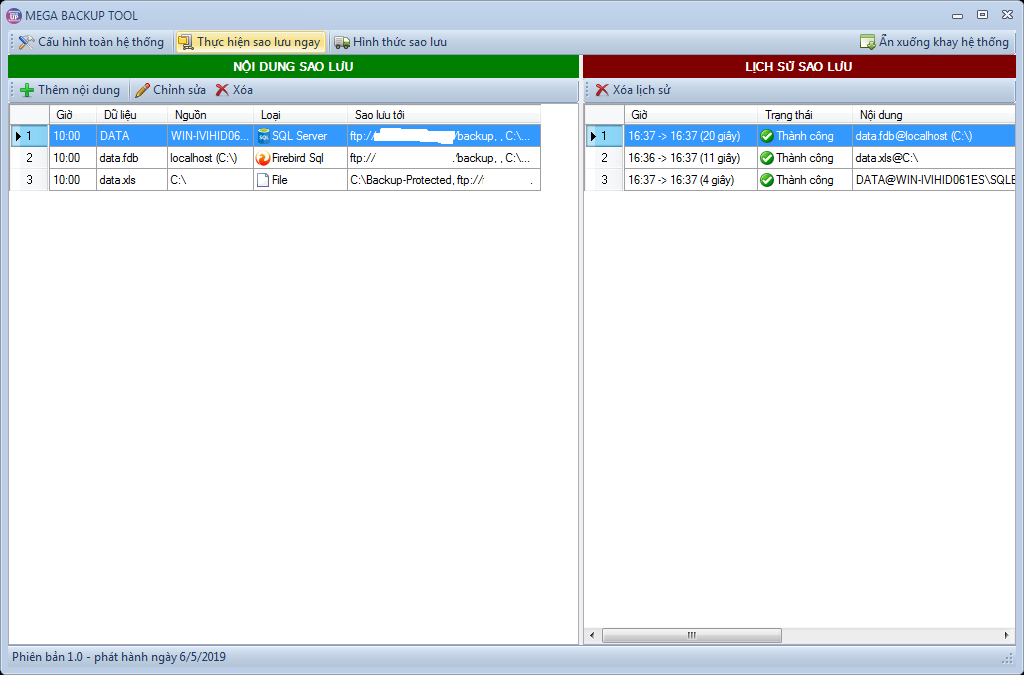
<p>Sau khi thiết lập thử và thực hiện<br  />
&nbsp;</p>
<br  />
<img alt="Megabackup HuongDan18 1024x675" height="675" src="https://phanmemthienha.com/uploads/news/2019_05/megabackup-huongdan18-1024x675_1.png" width="1024" />
<p><br  />
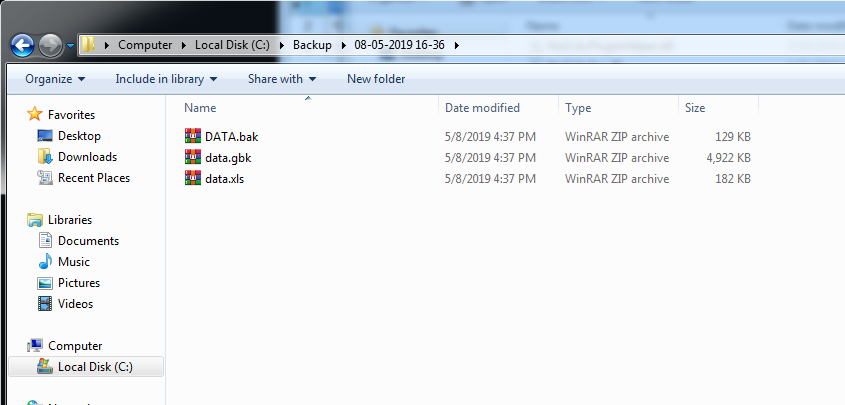
Kết quả sao lưu trong thư mục của máy tính<br  />
&nbsp;</p>
<br  />
<img alt="Megabackup HuongDan21" src="https://phanmemthienha.com/uploads/news/2019_05/megabackup-huongdan21.png" width="845" />
<p><br  />
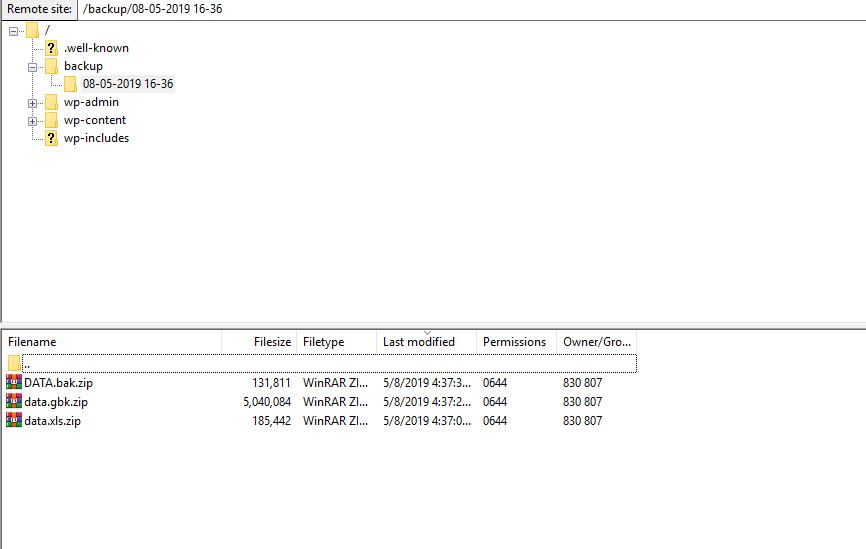
Trên ftp server<br  />
&nbsp;</p>
<br  />
<img alt="Megabackup HuongDan20" src="https://phanmemthienha.com/uploads/news/2019_05/megabackup-huongdan20.png" width="866" />
<p><br  />
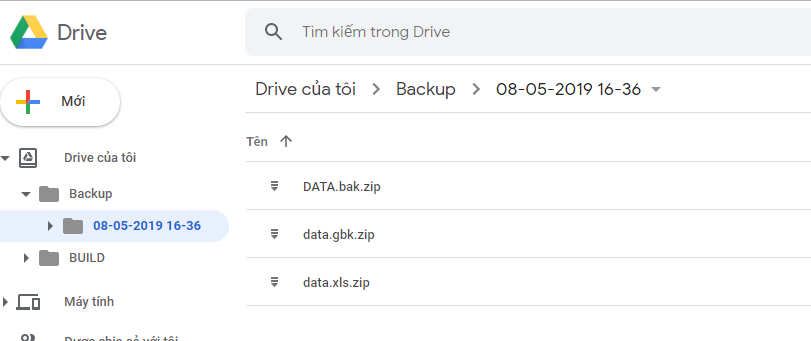
Trên google drive<br  />
&nbsp;</p>
<br  />
<img alt="Megabackup HuongDan19" src="https://phanmemthienha.com/uploads/news/2019_05/megabackup-huongdan19.png" width="811" />
<p><br  />
Chúc bạn thành công</p>

<h2>Video thử nghiệm thư mục bảo vệ khi máy dính ransomware ( LINK thư viện viruts <a href="https://github.com/mstfknn/malware-sample-library" target="_blank">tại đây )</a><br  />
&nbsp;</h2>
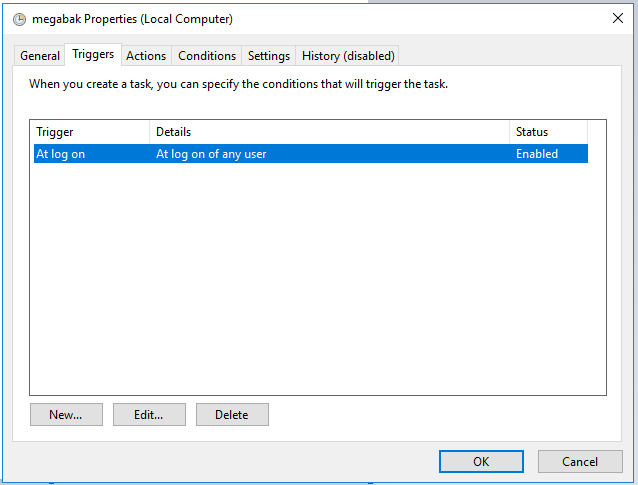
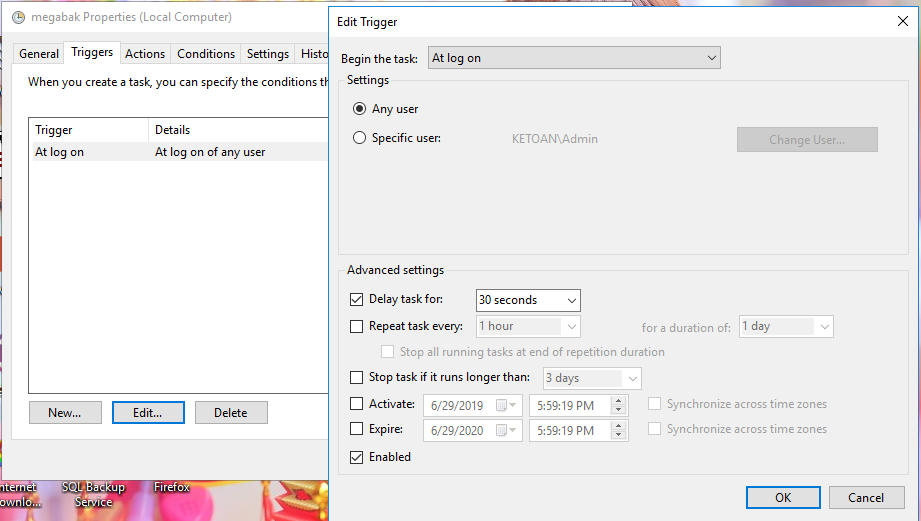
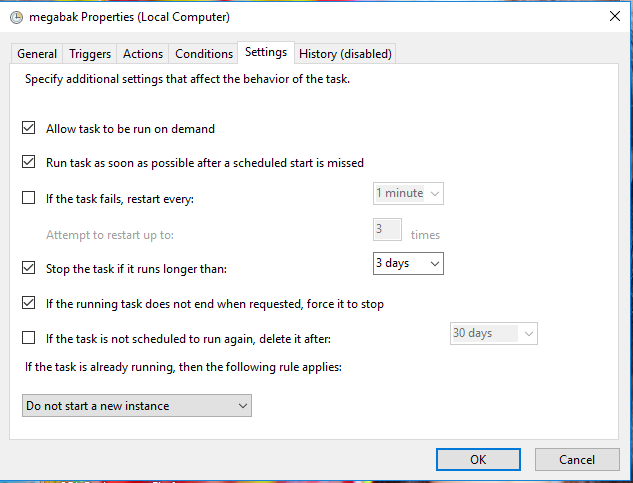
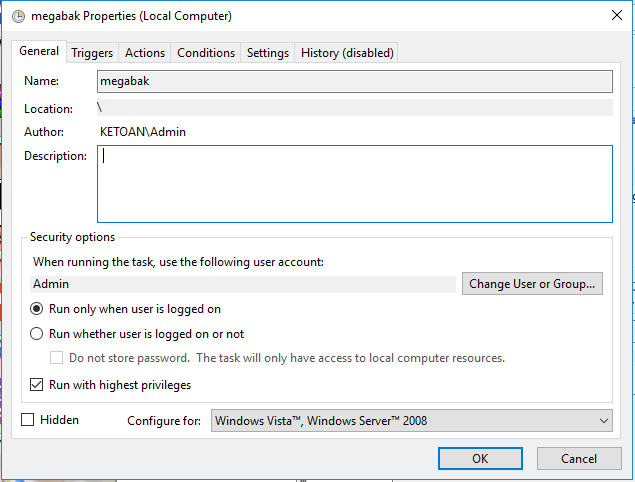
<strong>SAU KHI CÀI ĐẶT THÌ PHẢI THIẾT LẬP CHO CHƯƠNG TRÌNH TỰ ĐỘNG KHỞI ĐỘNG CÙNG WINDOWS</strong><br  />
<br  />
<br  />
<img alt="1" height="482" src="https://phanmemthienha.com/uploads/news/2019_06/1.png" width="635" /><br  />
<br  />
<img alt="2" height="485" src="https://phanmemthienha.com/uploads/news/2019_06/2.png" width="638" /><br  />
<br  />
<img alt="2 2" height="521" src="https://phanmemthienha.com/uploads/news/2019_06/2-2.png" width="921" /><br  />
<br  />
<img alt="3" height="483" src="https://phanmemthienha.com/uploads/news/2019_06/3.png" width="633" /><br  />
<br  />
&nbsp;
		</div>
	</div>
	<div id="footer" class="clearfix">
		<div id="url">
			<strong>URL của bản tin này: </strong><a href="https://phanmemthienha.com/news/huong-dan-phan-mem/phan-mem-sao-luu-mega-backup-137.html" title="Phần mềm sao lưu Mega Backup">https://phanmemthienha.com/news/huong-dan-phan-mem/phan-mem-sao-luu-mega-backup-137.html</a>

		</div>
		<div class="clear"></div>
		<div class="copyright">
			&copy; PHAN MEM THIEN HA
		</div>
		<div id="contact">
			<a href="mailto:phamhuy842005@gmail.com">phamhuy842005@gmail.com</a>
		</div>
	</div>
</div>
        <div id="timeoutsess" class="chromeframe">
            Bạn đã không sử dụng Site, <a onclick="timeoutsesscancel();" href="https://phanmemthienha.com/#">Bấm vào đây để duy trì trạng thái đăng nhập</a>. Thời gian chờ: <span id="secField"> 60 </span> giây
        </div>
        <div id="openidResult" class="nv-alert" style="display:none"></div>
        <div id="openidBt" data-result="" data-redirect=""></div>
<script src="https://phanmemthienha.com/assets/js/jquery/jquery.min.js"></script>
<script>var nv_base_siteurl="/",nv_lang_data="vi",nv_lang_interface="vi",nv_name_variable="nv",nv_fc_variable="op",nv_lang_variable="language",nv_module_name="news",nv_func_name="savefile",nv_is_user=0, nv_my_ofs=-4,nv_my_abbr="EDT",nv_cookie_prefix="nv4c_y8Y7D",nv_check_pass_mstime=1738000,nv_area_admin=0,nv_safemode=0,theme_responsive=1,nv_is_recaptcha=1,nv_recaptcha_sitekey="6LeSarIUAAAAAHRq6xkHwO6J0YYQOdMxgqKTXoL_",nv_recaptcha_type="image",nv_recaptcha_elements=[];</script>
<script src="https://phanmemthienha.com/assets/js/language/vi.js"></script>
<script src="https://phanmemthienha.com/assets/js/global.js"></script>
<script src="https://phanmemthienha.com/themes/default/js/news.js"></script>
<script src="https://phanmemthienha.com/themes/popovleather/js/main.js"></script>
<script src="https://phanmemthienha.com/themes/popovleather/js/bootstrap.min.js"></script>
</body>
</html>