<!DOCTYPE html>
	<html lang="vi" xmlns="http://www.w3.org/1999/xhtml" prefix="og: http://ogp.me/ns#">
	<head>
<title>Connect Firebird localhost DB with php</title>
<meta name="description" content="Connect Firebird localhost DB with php - Savefile - Tin Tức - https&#x3A;&#x002F;&#x002F;phanmemthienha.com&#x002F;news&#x002F;savefile&#x002F;huong-dan-phan-mem&#x002F;connect-firebird-localhost-db-with-php-157.html">
<meta name="author" content="PHAN MEM THIEN HA">
<meta name="copyright" content="PHAN MEM THIEN HA [phamhuy842005@gmail.com]">
<meta name="robots" content="index, archive, follow, noodp">
<meta name="googlebot" content="index,archive,follow,noodp">
<meta name="msnbot" content="all,index,follow">
<meta name="generator" content="NukeViet v4.0">
<meta name="viewport" content="width=device-width, initial-scale=1">
<meta http-equiv="Content-Type" content="text/html; charset=utf-8">
<meta property="og:title" content="Connect Firebird localhost DB with php">
<meta property="og:type" content="website">
<meta property="og:description" content="Savefile - Tin Tức - https&#x3A;&#x002F;&#x002F;phanmemthienha.com&#x002F;news&#x002F;savefile&#x002F;huong-dan-phan-mem&#x002F;connect-firebird-localhost-db-with-php-157.html">
<meta property="og:site_name" content="PHAN MEM THIEN HA">
<meta property="og:url" content="https://phanmemthienha.com/news/huong-dan-phan-mem/connect-firebird-localhost-db-with-php-157.html">
<link rel="shortcut icon" href="https://phanmemthienha.com/uploads/logo-shop-thien-ha-5.png">
<link rel="canonical" href="https://phanmemthienha.com/news/huong-dan-phan-mem/connect-firebird-localhost-db-with-php-157.html">
<link rel="alternate" href="https://phanmemthienha.com/news/rss/" title="Tin Tức" type="application/rss+xml">
<link rel="alternate" href="https://phanmemthienha.com/news/rss/huong-dan-phan-mem/" title="Tin Tức - Hướng dẫn phần mềm" type="application/rss+xml">
<link rel="alternate" href="https://phanmemthienha.com/news/rss/huong-dan-noi-bo/" title="Tin Tức - Hướng dẫn nội bộ" type="application/rss+xml">
<link rel="alternate" href="https://phanmemthienha.com/news/rss/Doi-tac/" title="Tin Tức - Đối tác" type="application/rss+xml">
<link rel="alternate" href="https://phanmemthienha.com/news/rss/Tuyen-dung/" title="Tin Tức - Tuyển dụng" type="application/rss+xml">
<link rel="preload" as="script" href="https://phanmemthienha.com/assets/js/jquery/jquery.min.js">
<link rel="preload" as="script" href="https://phanmemthienha.com/assets/js/language/vi.js">
<link rel="preload" as="script" href="https://phanmemthienha.com/assets/js/global.js">
<link rel="preload" as="script" href="https://phanmemthienha.com/themes/default/js/news.js">
<link rel="preload" as="script" href="https://phanmemthienha.com/themes/popovleather/js/main.js">
<link rel="preload" as="script" href="https://phanmemthienha.com/themes/popovleather/js/bootstrap.min.js">
<link rel="StyleSheet" href="https://phanmemthienha.com/assets/css/font-awesome.min.css">
<link rel="StyleSheet" href="https://phanmemthienha.com/themes/popovleather/css/bootstrap.min.css">
<link rel="StyleSheet" href="https://phanmemthienha.com/themes/popovleather/css/style.css">
<link rel="StyleSheet" href="https://phanmemthienha.com/themes/popovleather/css/style.responsive.css">
<link rel="StyleSheet" href="https://phanmemthienha.com/themes/default/css/news.css">
<link rel="StyleSheet" href="https://phanmemthienha.com/assets/css/popovleather.vi.0.css?t=87">
<style>
	body{background: #fff;}
</style>
	</head>
	<body>
<div id="print">
	<div id="hd_print">
		<h2 class="pull-left">PHAN MEM THIEN HA</h2>
		<p class="pull-right"><a title="PHAN MEM THIEN HA" href="https://phanmemthienha.com/">https://phanmemthienha.com</a></p>
	</div>
	<div class="clear"></div>
	<hr />
	<div id="content">
		<h1>Connect Firebird localhost DB with php</h1>
		<ul class="list-inline">
			<li>Chủ nhật - 16/02/2020 20:43</li>
			<li class="hidden-print txtrequired"><em class="fa fa-print">&nbsp;</em><a title="In ra" href="javascript:;" onclick="window.print()">In ra</a></li>
			<li class="hidden-print txtrequired"><em class="fa fa-power-off">&nbsp;</em><a title="Đóng cửa sổ này" href="javascript:;" onclick="window.close()">Đóng cửa sổ này</a></li>
		</ul>
		<div class="clear"></div>
		<div id="hometext">
			Connect Firebird localhost DB with php and install firebird with xampp
		</div>
				<div class="imghome">
			<img alt="Connect Firebird localhost DB with php" src="https://phanmemthienha.com/uploads/news/2020_03/bbq2.png" width="460" class="img-thumbnail" />
		</div>
		<div class="clear"></div>
		<div id="bodytext" class="clearfix">
			<pre>
<code class="language-php">&lt;?php

$host = &#039;localhost:D:\LAP TRINH QLBH\SHOP 7.1\Programs-71\Database\SHOP.FDB&#039;;
$username = &#039;SYSDBA&#039;;
$password = &#039;masterkey&#039;;
$dbh = ibase_pconnect(&quot;localhost:D:\LAP TRINH QLBH\SHOP 7.1\Programs-71\Database\SHOP.FDB&quot;, &quot;SYSDBA&quot;, &quot;masterkey&quot;) or die(&#039;die message&#039;);
    $q = ibase_query($dbh, &quot;select * from TDONHANG&quot;);
    while ($r = ibase_fetch_object($q)) {
        $some_value = $r-&gt;NAME;
        echo $some_value;
    }
//ibase_free_result($sth);
ibase_close($dbh);

?&gt;</code></pre>
chi tiết<br  />
https://stackoverflow.com/questions/46205473/connect-firebird-localhost-db-with-php
<h2 class="mb-3" id="content">HowTo: Install Firebird/Interbase with PHP on Windows. A step-by-step tutorial</h2>

<h4>Step 1:<br  />
Install Firebird SQL <a href="http://firebirdsql.org/en/firebird-2-5/" target="_blank">Download</a> ( I install V2.5 )</h4>
Install XAMPP for Windows 10 64bit <a href="https://www.apachefriends.org/xampp-files/7.4.2/xampp-windows-x64-7.4.2-0-VC15-installer.exe" target="_blank">download</a><br  />
Step 2:
<ul>
	<li>Download the zip archive: PHP Driver <a href="http://firebirdsql.org/en/php-driver/" target="_blank">Download</a> ( I install <a href="http://firebirdsql.org/file/downloads/php/php-7.4.0-interbase-win64.zip" target="_blank">php 7.4</a> )</li>
	<li>Extract the archive to <code>D:\</code>PHP Driver &nbsp;</li>
</ul>

<h4>Configure PHP</h4>

<ul>
	<li>Copy C:\Program Files\Firebird\Firebird_2_5\bin<code>\fbclient.dll</code> to your <code>C:\windows\system32</code> directory and rename the file to <code>gds32.dll <strong>( If GDS32.dll not found )</strong><br  />
	and also you can try copy fbclient.dll to </code>C:\xampp\apache\bin</li>
	<li>Copy <code>php_interbase.dll</code>,&nbsp;php_interbase_nts<code>.dll</code> from your&nbsp;<code>D:\</code>PHP Driver to&nbsp; <code>php\ext</code> directory and to the <code>C:\windows\system32</code> directory.</li>
	<li>Copy <code>libeay32.dll</code> and <code>ssleay32.dll</code> from your C:\xampp&nbsp; directory to the <code>C:\windows\system32</code> directory.</li>
	<li>Edit your <code>php.ini</code>, un-comment the line<br  />
	<code>extension=php_interbase.dll</code><br  />
	<code>extension=</code>php_interbase_nts<code>.dll</code><br  />
	(you have to remove the semicolon from that line).</li>
	<li>Restart your webserver (Apache).</li>
</ul>
Bộ config sẵn <a href="https://drive.google.com/open?id=1AuCfFwmCnnp88iYXdxWyhXZalPLShRVV" target="_blank">tại đây</a><br  />
<br  />
<strong>NB:</strong> the default admin username:password pair for Firebird is <code>SYSDBA:masterkey</code>.<br  />
+ https://firebirdsql.org/file/documentation/reference_manuals/fbdevgd-en/html/fbdevgd30-php-iface.html<br  />
+ https://www.php.net/manual/en/book.ibase.php<br  />
+ https://github.com/FirebirdSQL/php-firebird/tree/master/tests<br  />
<br  />
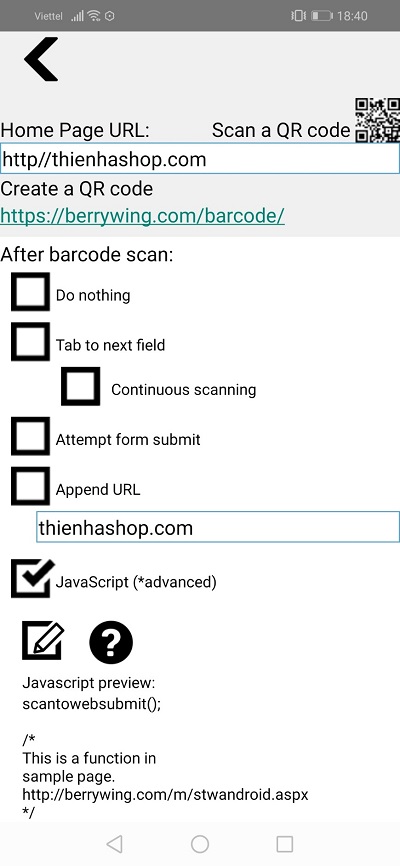
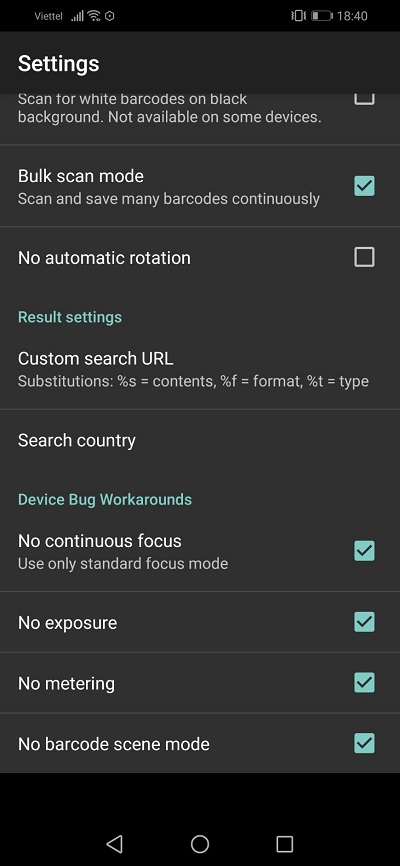
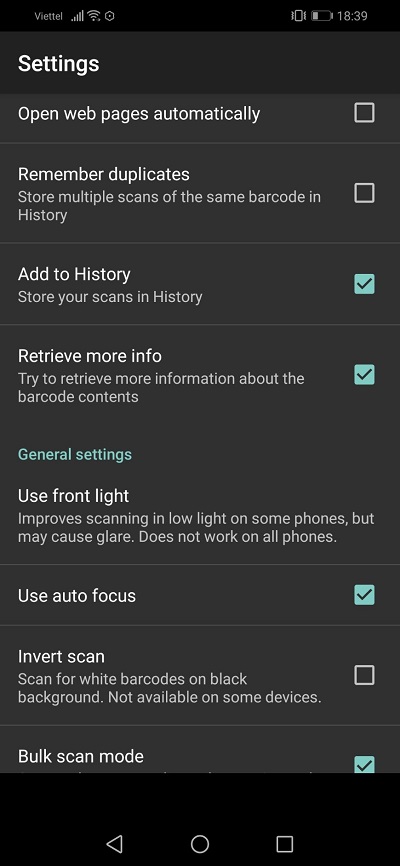
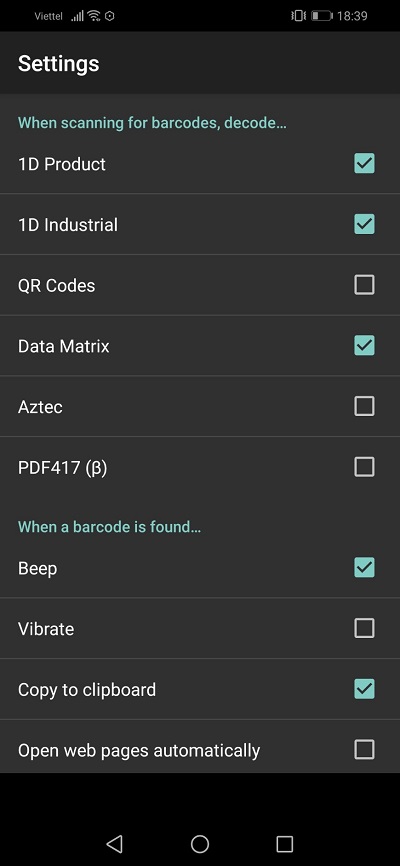
CONFIG SCAN TO WEB<br  />
<br  />
<img alt="1" height="866" src="https://phanmemthienha.com/uploads/news/2020_03/1.jpg" width="400" /><br  />
<img alt="2" height="866" src="https://phanmemthienha.com/uploads/news/2020_03/2.jpg" width="400" /><br  />
<img alt="3" height="866" src="https://phanmemthienha.com/uploads/news/2020_03/3.jpg" width="400" /><br  />
<img alt="4" height="866" src="https://phanmemthienha.com/uploads/news/2020_03/4.jpg" width="400" /><br  />
<br  />
Xampp 3.4 ( PHP 7.4 ) nếu cài nuke thì báo lỗi Mcrypt library not available
<p>&nbsp;</p>

<p>1-First, you should download the suitable version for your system from here:<br  />
<a href="https://pecl.php.net/package/mcrypt/1.0.3/windows" rel="nofollow">https://pecl.php.net/package/mcrypt/1.0.3/windows</a></p>

<p><strong>Download file</strong> <em>php_mcrypt-1.0.3-7.4-ts-vc15-x64</em><strong> for xampp 7.4</strong><br  />
<br  />
2-Later, you should copy php_mcrypt.dll under ../xampp/php/ext/</p>

<p>3-you should enable extension like extension=mcrypt from xampp/php/php.ini</p>

<p>personly I modified the php.ini file and i add this lines :</p>

<p>extension=imap<br  />
extension=mcrypt</p>

<p>of course, these two lines have the 3 dll file saved on ../xampp/php/ext/ as :</p>

<p>php_imap.dll<br  />
php_mcrypt.dll</p>
<br  />
<br  />
<br  />
&nbsp;
		</div>
	</div>
	<div id="footer" class="clearfix">
		<div id="url">
			<strong>URL của bản tin này: </strong><a href="https://phanmemthienha.com/news/huong-dan-phan-mem/connect-firebird-localhost-db-with-php-157.html" title="Connect Firebird localhost DB with php">https://phanmemthienha.com/news/huong-dan-phan-mem/connect-firebird-localhost-db-with-php-157.html</a>

		</div>
		<div class="clear"></div>
		<div class="copyright">
			&copy; PHAN MEM THIEN HA
		</div>
		<div id="contact">
			<a href="mailto:phamhuy842005@gmail.com">phamhuy842005@gmail.com</a>
		</div>
	</div>
</div>
        <div id="timeoutsess" class="chromeframe">
            Bạn đã không sử dụng Site, <a onclick="timeoutsesscancel();" href="https://phanmemthienha.com/#">Bấm vào đây để duy trì trạng thái đăng nhập</a>. Thời gian chờ: <span id="secField"> 60 </span> giây
        </div>
        <div id="openidResult" class="nv-alert" style="display:none"></div>
        <div id="openidBt" data-result="" data-redirect=""></div>
<script src="https://phanmemthienha.com/assets/js/jquery/jquery.min.js"></script>
<script>var nv_base_siteurl="/",nv_lang_data="vi",nv_lang_interface="vi",nv_name_variable="nv",nv_fc_variable="op",nv_lang_variable="language",nv_module_name="news",nv_func_name="savefile",nv_is_user=0, nv_my_ofs=-4,nv_my_abbr="EDT",nv_cookie_prefix="nv4c_y8Y7D",nv_check_pass_mstime=1738000,nv_area_admin=0,nv_safemode=0,theme_responsive=1,nv_is_recaptcha=1,nv_recaptcha_sitekey="6LeSarIUAAAAAHRq6xkHwO6J0YYQOdMxgqKTXoL_",nv_recaptcha_type="image",nv_recaptcha_elements=[];</script>
<script src="https://phanmemthienha.com/assets/js/language/vi.js"></script>
<script src="https://phanmemthienha.com/assets/js/global.js"></script>
<script src="https://phanmemthienha.com/themes/default/js/news.js"></script>
<script src="https://phanmemthienha.com/themes/popovleather/js/main.js"></script>
<script src="https://phanmemthienha.com/themes/popovleather/js/bootstrap.min.js"></script>
</body>
</html>