<!DOCTYPE html>
	<html lang="vi" xmlns="http://www.w3.org/1999/xhtml" prefix="og: http://ogp.me/ns#">
	<head>
<title>Cách xem, xóa mật khẩu Wifi đã lưu trên laptop</title>
<meta name="description" content="Cách xem, xóa mật khẩu Wifi đã lưu trên laptop - Savefile - Tin Tức -...">
<meta name="author" content="PHAN MEM THIEN HA">
<meta name="copyright" content="PHAN MEM THIEN HA [phamhuy842005@gmail.com]">
<meta name="robots" content="index, archive, follow, noodp">
<meta name="googlebot" content="index,archive,follow,noodp">
<meta name="msnbot" content="all,index,follow">
<meta name="generator" content="NukeViet v4.0">
<meta name="viewport" content="width=device-width, initial-scale=1">
<meta http-equiv="Content-Type" content="text/html; charset=utf-8">
<meta property="og:title" content="Cách xem, xóa mật khẩu Wifi đã lưu trên laptop">
<meta property="og:type" content="website">
<meta property="og:description" content="Savefile - Tin Tức - https&#x3A;&#x002F;&#x002F;phanmemthienha.com&#x002F;news&#x002F;savefile&#x002F;huong-dan-phan-mem&#x002F;cach-xem-xoa-mat-khau-wifi-da-luu-tren-laptop-30.html">
<meta property="og:site_name" content="PHAN MEM THIEN HA">
<meta property="og:url" content="https://phanmemthienha.com/news/huong-dan-phan-mem/cach-xem-xoa-mat-khau-wifi-da-luu-tren-laptop-30.html">
<link rel="shortcut icon" href="https://phanmemthienha.com/uploads/logo-shop-thien-ha-5.png">
<link rel="canonical" href="https://phanmemthienha.com/news/huong-dan-phan-mem/cach-xem-xoa-mat-khau-wifi-da-luu-tren-laptop-30.html">
<link rel="alternate" href="https://phanmemthienha.com/news/rss/" title="Tin Tức" type="application/rss+xml">
<link rel="alternate" href="https://phanmemthienha.com/news/rss/huong-dan-phan-mem/" title="Tin Tức - Hướng dẫn phần mềm" type="application/rss+xml">
<link rel="alternate" href="https://phanmemthienha.com/news/rss/huong-dan-noi-bo/" title="Tin Tức - Hướng dẫn nội bộ" type="application/rss+xml">
<link rel="alternate" href="https://phanmemthienha.com/news/rss/Doi-tac/" title="Tin Tức - Đối tác" type="application/rss+xml">
<link rel="alternate" href="https://phanmemthienha.com/news/rss/Tuyen-dung/" title="Tin Tức - Tuyển dụng" type="application/rss+xml">
<link rel="preload" as="script" href="https://phanmemthienha.com/assets/js/jquery/jquery.min.js">
<link rel="preload" as="script" href="https://phanmemthienha.com/assets/js/language/vi.js">
<link rel="preload" as="script" href="https://phanmemthienha.com/assets/js/global.js">
<link rel="preload" as="script" href="https://phanmemthienha.com/themes/default/js/news.js">
<link rel="preload" as="script" href="https://phanmemthienha.com/themes/popovleather/js/main.js">
<link rel="preload" as="script" href="https://phanmemthienha.com/themes/popovleather/js/bootstrap.min.js">
<link rel="StyleSheet" href="https://phanmemthienha.com/assets/css/font-awesome.min.css">
<link rel="StyleSheet" href="https://phanmemthienha.com/themes/popovleather/css/bootstrap.min.css">
<link rel="StyleSheet" href="https://phanmemthienha.com/themes/popovleather/css/style.css">
<link rel="StyleSheet" href="https://phanmemthienha.com/themes/popovleather/css/style.responsive.css">
<link rel="StyleSheet" href="https://phanmemthienha.com/themes/default/css/news.css">
<link rel="StyleSheet" href="https://phanmemthienha.com/assets/css/popovleather.vi.0.css?t=87">
<style>
	body{background: #fff;}
</style>
	</head>
	<body>
<div id="print">
	<div id="hd_print">
		<h2 class="pull-left">PHAN MEM THIEN HA</h2>
		<p class="pull-right"><a title="PHAN MEM THIEN HA" href="https://phanmemthienha.com/">https://phanmemthienha.com</a></p>
	</div>
	<div class="clear"></div>
	<hr />
	<div id="content">
		<h1>Cách xem, xóa mật khẩu Wifi đã lưu trên laptop</h1>
		<ul class="list-inline">
			<li>Thứ tư - 08/03/2017 22:39</li>
			<li class="hidden-print txtrequired"><em class="fa fa-print">&nbsp;</em><a title="In ra" href="javascript:;" onclick="window.print()">In ra</a></li>
			<li class="hidden-print txtrequired"><em class="fa fa-power-off">&nbsp;</em><a title="Đóng cửa sổ này" href="javascript:;" onclick="window.close()">Đóng cửa sổ này</a></li>
		</ul>
		<div class="clear"></div>
		<div id="hometext">
			Xóa mật khẩu wifi đã lưu trên laptop, cách xóa thông tin mạng không dây,Cách xem mật khẩu wifi đã lưu trên laptop, hiển thị pass wifi trên máy tính, xem mật khẩu wifi win7 xp
		</div>
		<div id="bodytext" class="clearfix">
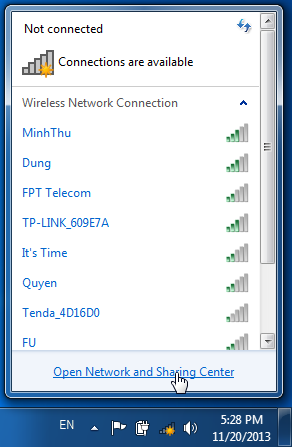
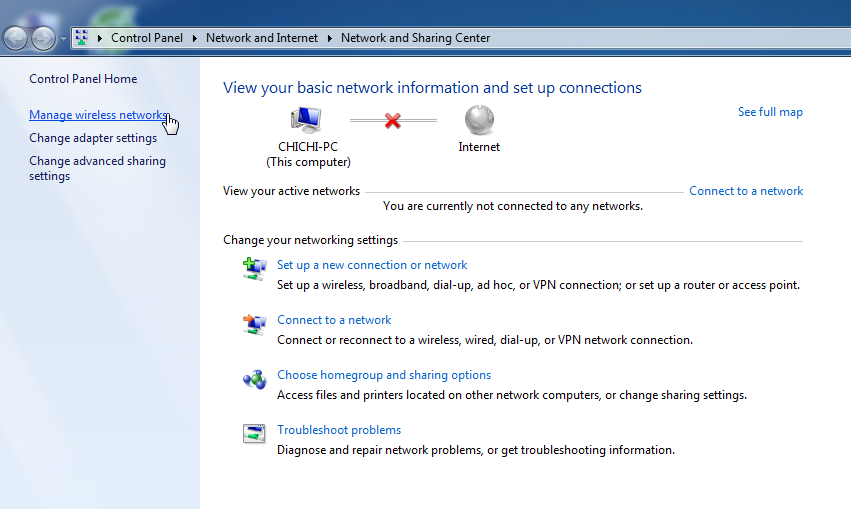
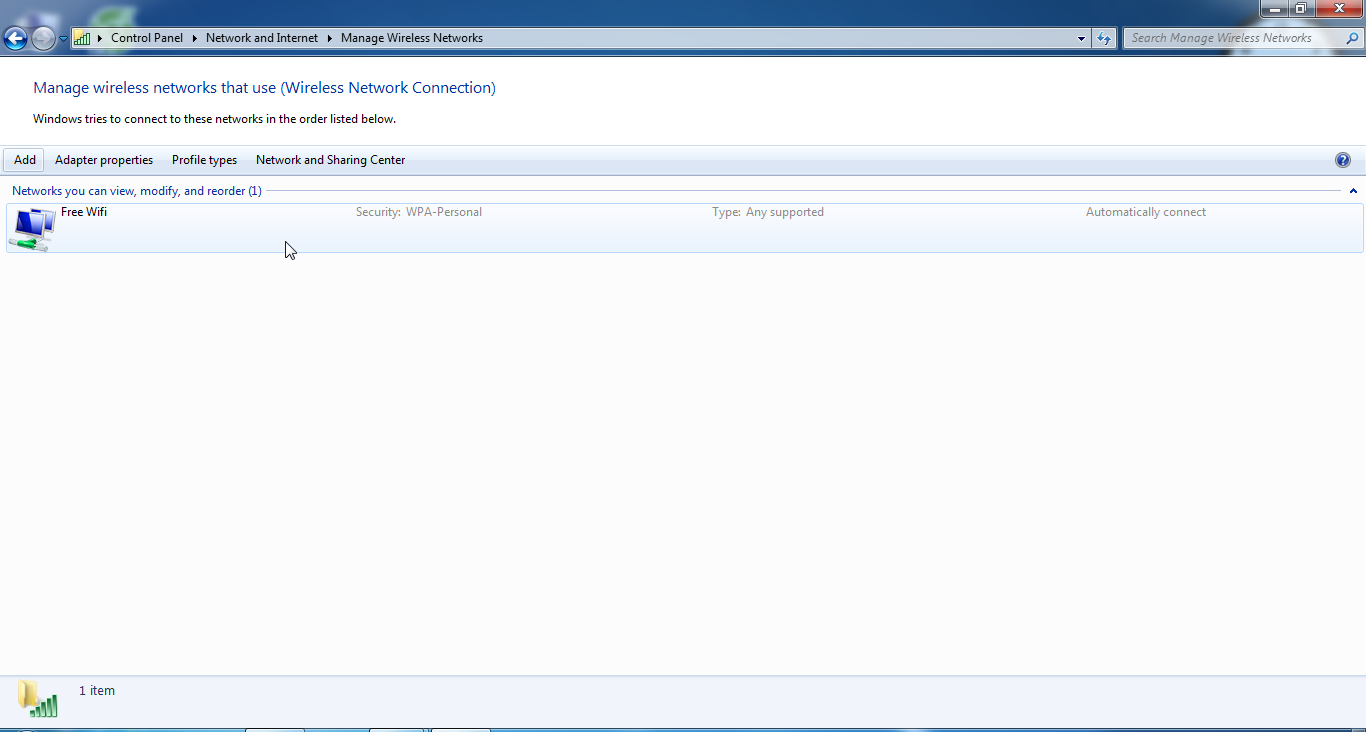
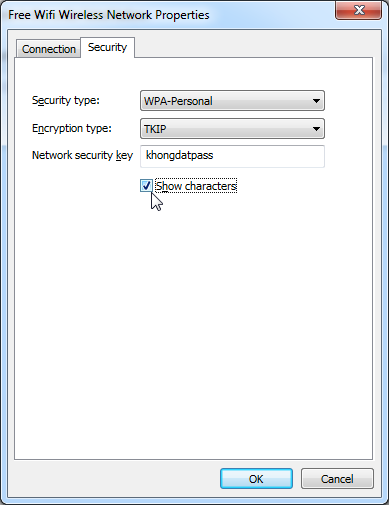
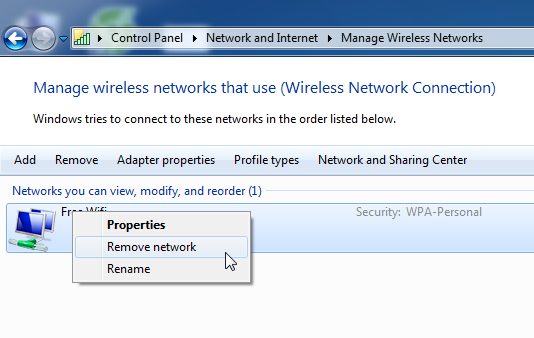
			Mạng không dây bây giờ đã khá phổ biển. Bạn dùng thường xuyên tại nhà, quán cafe hay tại trường học cũng có. Nếu muốn xem/xóa mật khẩu đã lưu trên máy tính thì thật đơn giản với vài thao tác sau.<br  /><br  />Kích vào biểu tượng cột sóng wifi ở góc hiển thị đồng hồ, chọn <b>Open Network and Sharing Center</b><br  />&nbsp; <img alt="huong dan xem xoa pas wifi tren lap top" border="0" height="447" src="https://phanmemthienha.com/uploads/news/2017_03/huong-dan-xem-xoa-pas-wifi-tren-lap-top.png" width="292" /><br  />Chọn tiếp <b>Manage wireless networks</b> để mở ra danh sách các mạng wifi bạn đã từng kết nối.<br  /><br  />&nbsp; <img alt="xoa mat khau da luu tre lap top2" border="0" height="509" src="https://phanmemthienha.com/uploads/news/2017_03/xoa-mat-khau-da-luu-tre-lap-top2.png" width="851" /><br  />Kích đúp vào tên Wifi muốn xem mật khẩu. Tại bước này cũng có thể thay tên hiển thị của nó bằng cách kích vào tên, tên sẽ được bôi đen để sửa.<br  /><br  /><img alt="xoa mat khau da luu tre lap top3" border="0" height="732" src="https://phanmemthienha.com/uploads/news/2017_03/xoa-mat-khau-da-luu-tre-lap-top3.png" width="1366" /><br  /><br  />Chọn <b>Show characters</b> để hiển thị mật khẩu đã lưu, chọn OK để thoát ra.<br  /><br  />&nbsp; <img alt="" border="0" height="505" src="https://phanmemthienha.com/uploads/news/2017_03/xoa-mat-khau-da-luu-tre-lap-top4.png" width="389" /><br  />Hay kích chuột phải vào wifi muốn xóa, chọn <b>Remove network</b> để xóa mọi thông tin cũng như mật khẩu của wifi này. Hoặc cách khác là kích chọn, nhấn phím Delete, nhấn <b>Yes</b> để xác nhận xóa.<br  /><br  />&nbsp; <img alt="" border="0" height="338" src="https://phanmemthienha.com/uploads/news/2017_03/xoa-mat-khau-da-luu-tre-lap-top5.png" width="534" /> &nbsp;
		</div>
	</div>
	<div id="footer" class="clearfix">
		<div id="url">
			<strong>URL của bản tin này: </strong><a href="https://phanmemthienha.com/news/huong-dan-phan-mem/cach-xem-xoa-mat-khau-wifi-da-luu-tren-laptop-30.html" title="Cách xem, xóa mật khẩu Wifi đã lưu trên laptop">https://phanmemthienha.com/news/huong-dan-phan-mem/cach-xem-xoa-mat-khau-wifi-da-luu-tren-laptop-30.html</a>

		</div>
		<div class="clear"></div>
		<div class="copyright">
			&copy; PHAN MEM THIEN HA
		</div>
		<div id="contact">
			<a href="mailto:phamhuy842005@gmail.com">phamhuy842005@gmail.com</a>
		</div>
	</div>
</div>
        <div id="timeoutsess" class="chromeframe">
            Bạn đã không sử dụng Site, <a onclick="timeoutsesscancel();" href="https://phanmemthienha.com/#">Bấm vào đây để duy trì trạng thái đăng nhập</a>. Thời gian chờ: <span id="secField"> 60 </span> giây
        </div>
        <div id="openidResult" class="nv-alert" style="display:none"></div>
        <div id="openidBt" data-result="" data-redirect=""></div>
<script src="https://phanmemthienha.com/assets/js/jquery/jquery.min.js"></script>
<script>var nv_base_siteurl="/",nv_lang_data="vi",nv_lang_interface="vi",nv_name_variable="nv",nv_fc_variable="op",nv_lang_variable="language",nv_module_name="news",nv_func_name="savefile",nv_is_user=0, nv_my_ofs=-4,nv_my_abbr="EDT",nv_cookie_prefix="nv4c_y8Y7D",nv_check_pass_mstime=1738000,nv_area_admin=0,nv_safemode=0,theme_responsive=1,nv_is_recaptcha=1,nv_recaptcha_sitekey="6LeSarIUAAAAAHRq6xkHwO6J0YYQOdMxgqKTXoL_",nv_recaptcha_type="image",nv_recaptcha_elements=[];</script>
<script src="https://phanmemthienha.com/assets/js/language/vi.js"></script>
<script src="https://phanmemthienha.com/assets/js/global.js"></script>
<script src="https://phanmemthienha.com/themes/default/js/news.js"></script>
<script src="https://phanmemthienha.com/themes/popovleather/js/main.js"></script>
<script src="https://phanmemthienha.com/themes/popovleather/js/bootstrap.min.js"></script>
</body>
</html>