<!DOCTYPE html>
	<html lang="vi" xmlns="http://www.w3.org/1999/xhtml" prefix="og: http://ogp.me/ns#">
	<head>
<title>CÁCH TINH CHỈNH ADOBE GAMMA CHO MÀU SẮC THỰC HƠN</title>
<meta name="description" content="CÁCH TINH CHỈNH ADOBE GAMMA CHO MÀU SẮC THỰC HƠN - Savefile - Tin Tức -...">
<meta name="author" content="PHAN MEM THIEN HA">
<meta name="copyright" content="PHAN MEM THIEN HA [phamhuy842005@gmail.com]">
<meta name="robots" content="index, archive, follow, noodp">
<meta name="googlebot" content="index,archive,follow,noodp">
<meta name="msnbot" content="all,index,follow">
<meta name="generator" content="NukeViet v4.0">
<meta name="viewport" content="width=device-width, initial-scale=1">
<meta http-equiv="Content-Type" content="text/html; charset=utf-8">
<meta property="og:title" content="CÁCH TINH CHỈNH ADOBE GAMMA CHO MÀU SẮC THỰC HƠN">
<meta property="og:type" content="website">
<meta property="og:description" content="Savefile - Tin Tức - https&#x3A;&#x002F;&#x002F;phanmemthienha.com&#x002F;news&#x002F;savefile&#x002F;huong-dan-phan-mem&#x002F;cach-tinh-chinh-adobe-gamma-cho-mau-sac-thuc-hon-23.html">
<meta property="og:site_name" content="PHAN MEM THIEN HA">
<meta property="og:url" content="https://phanmemthienha.com/news/huong-dan-phan-mem/cach-tinh-chinh-adobe-gamma-cho-mau-sac-thuc-hon-23.html">
<link rel="shortcut icon" href="https://phanmemthienha.com/uploads/logo-shop-thien-ha-5.png">
<link rel="canonical" href="https://phanmemthienha.com/news/huong-dan-phan-mem/cach-tinh-chinh-adobe-gamma-cho-mau-sac-thuc-hon-23.html">
<link rel="alternate" href="https://phanmemthienha.com/news/rss/" title="Tin Tức" type="application/rss+xml">
<link rel="alternate" href="https://phanmemthienha.com/news/rss/huong-dan-phan-mem/" title="Tin Tức - Hướng dẫn phần mềm" type="application/rss+xml">
<link rel="alternate" href="https://phanmemthienha.com/news/rss/huong-dan-noi-bo/" title="Tin Tức - Hướng dẫn nội bộ" type="application/rss+xml">
<link rel="alternate" href="https://phanmemthienha.com/news/rss/Doi-tac/" title="Tin Tức - Đối tác" type="application/rss+xml">
<link rel="alternate" href="https://phanmemthienha.com/news/rss/Tuyen-dung/" title="Tin Tức - Tuyển dụng" type="application/rss+xml">
<link rel="preload" as="script" href="https://phanmemthienha.com/assets/js/jquery/jquery.min.js">
<link rel="preload" as="script" href="https://phanmemthienha.com/assets/js/language/vi.js">
<link rel="preload" as="script" href="https://phanmemthienha.com/assets/js/global.js">
<link rel="preload" as="script" href="https://phanmemthienha.com/themes/default/js/news.js">
<link rel="preload" as="script" href="https://phanmemthienha.com/themes/popovleather/js/main.js">
<link rel="preload" as="script" href="https://phanmemthienha.com/themes/popovleather/js/bootstrap.min.js">
<link rel="StyleSheet" href="https://phanmemthienha.com/assets/css/font-awesome.min.css">
<link rel="StyleSheet" href="https://phanmemthienha.com/themes/popovleather/css/bootstrap.min.css">
<link rel="StyleSheet" href="https://phanmemthienha.com/themes/popovleather/css/style.css">
<link rel="StyleSheet" href="https://phanmemthienha.com/themes/popovleather/css/style.responsive.css">
<link rel="StyleSheet" href="https://phanmemthienha.com/themes/default/css/news.css">
<link rel="StyleSheet" href="https://phanmemthienha.com/assets/css/popovleather.vi.0.css?t=87">
<style>
	body{background: #fff;}
</style>
	</head>
	<body>
<div id="print">
	<div id="hd_print">
		<h2 class="pull-left">PHAN MEM THIEN HA</h2>
		<p class="pull-right"><a title="PHAN MEM THIEN HA" href="https://phanmemthienha.com/">https://phanmemthienha.com</a></p>
	</div>
	<div class="clear"></div>
	<hr />
	<div id="content">
		<h1>CÁCH TINH CHỈNH ADOBE GAMMA CHO MÀU SẮC THỰC HƠN</h1>
		<ul class="list-inline">
			<li>Thứ sáu - 24/02/2017 15:01</li>
			<li class="hidden-print txtrequired"><em class="fa fa-print">&nbsp;</em><a title="In ra" href="javascript:;" onclick="window.print()">In ra</a></li>
			<li class="hidden-print txtrequired"><em class="fa fa-power-off">&nbsp;</em><a title="Đóng cửa sổ này" href="javascript:;" onclick="window.close()">Đóng cửa sổ này</a></li>
		</ul>
		<div class="clear"></div>
		<div id="hometext">
			Bài này e viết cũng là chia sẻ chút kinh nghiệm cho<br />những ae nào mới vào nghề,để có 1 màn hình chuẩn<br />màu in ra với lab,ae nào biết test rồi thì bỏ qua,<br />chưa thì có thể vào quan tâm
		</div>
				<div class="imghome">
			<img alt="CÁCH TINH CHỈNH ADOBE GAMMA CHO MÀU SẮC THỰC HƠN" src="https://phanmemthienha.com/uploads/news/2017_02/mautest.jpg" width="460" class="img-thumbnail" />
		</div>
		<div class="clear"></div>
		<div id="bodytext" class="clearfix">
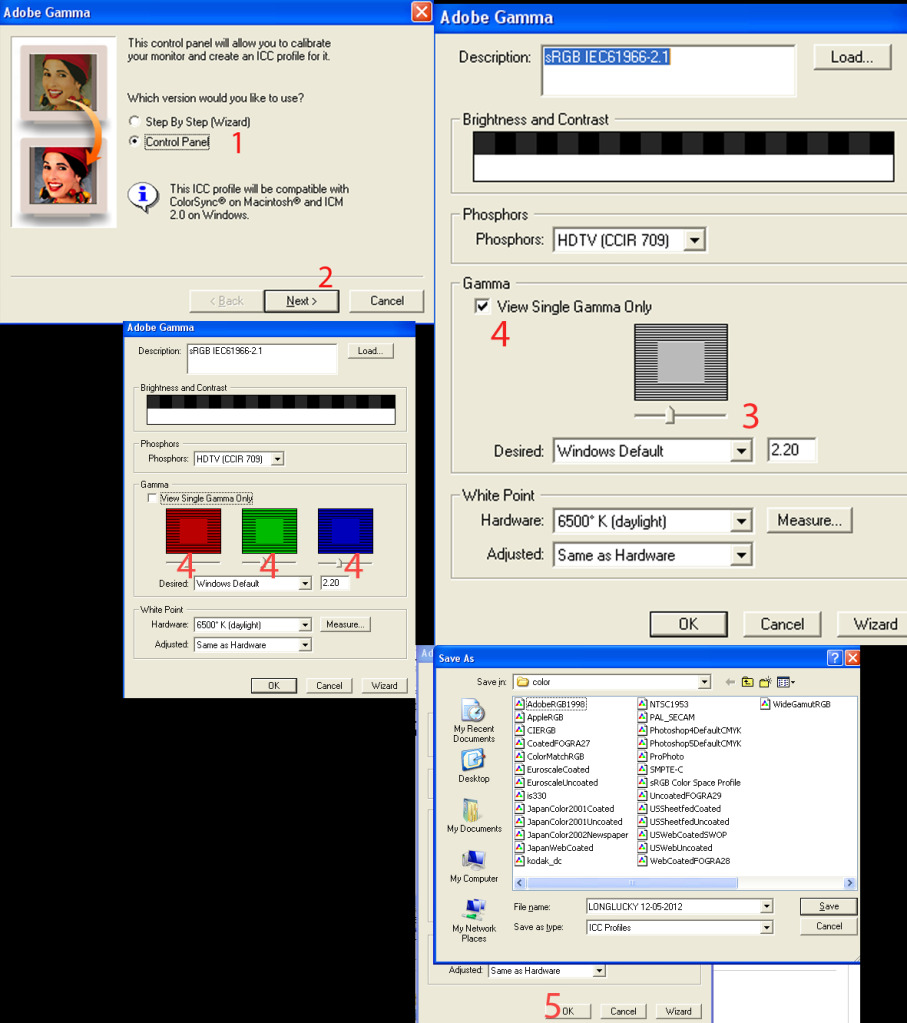
			<div class="bodytext margin-bottom-lg" id="news-bodyhtml"><span itemprop="articleBody" itemscope="" itemtype="http://schema.org/Article"><span itemprop="articleBody">Bước đầu tiên ae cần làm là,đến chỗ lab<br  />hay in ảnh,chọn 1 vài tấm hình,hoặc là lấy bảng<br  />màu của e bên dưới,đến bảo người ta in thẳng ở chế độ normal<br  /><br  />Bước thứ 2 là bắt đầu test thôi,ae mang ảnh về,mở file vừa in<br  />trên PTS ,xem màn mình với ảnh vừa in ra,xem độ chênh lệch<br  />màu sắc và tương phản nó như nào,nếu thấy khác biệt,chúng ta bắt đầu chỉnh thôi<br  />Có 2 cách chỉnh<br  />Cách t1: là chỉnh ngay trên màn hình,các bác bấm vào nút Menu<br  />và chọn chỉnh sáng tối hoặc là constrast,tiếp đó vào chế độ RGB<br  />chỉnh màu sắc và cái Temp (gọi chung là nhiệt độ màu) sao cho tương<br  />đối với ảnh in ra,như vậy là chuẩn rồi đấy (ae lưu ý tùy màn tùy<br  />hãng chỉnh sao cho hợp lý)<br  /><br  />Cách t2 : là vào cửa sổ start -&gt; setttings -&gt; Control Panel<br  />Mở bảng chỉnh Adobe Gamma ra,ae lưu ý hình như là từ PS CS3 sẽ<br  />ko hỗ trợ bảng chỉnh này nữa,nhưng ko sao,e sẽ up link down<br  />bên dưới,ae down về giải nén ra là xài bt thôi.Mở Adobe Gamma<br  />ra làm như sau,kick vào Cotrol Panel,sao đó next,bước thứ<br  />3 sẽ là chỉnh sáng tối,cảm thấy OK rồi thì qua bước thứ 4 sẽ là<br  />cân chỉnh màu sắc,nháy vào cái mắt View single.... để ra bảng màu,<br  />ae cân chỉnh làm sao,cho tương đối với ảnh Norman in ra,cảm giác ổn ổn<br  />rồi tiếp đó ta sẽ lưu file Test này lại,= cách nhấn vào OK,gõ file name tùy ý rồi save<br  />lại,cẩn thận hơn thì sau khi save ae vào lại,copy cái file vừa lưu,cất vào 1 chỗ,lần<br  />sau cần thì lại lấy ra đáp vào hộp Color là lại dùng bt,bước<br  />cuối cùng là mở ảnh trên PTS,để ảnh hiển thị ở chế độ đen trắng,<br  />nhìn xem nó có bị ngả màu gì ko,nếu đúng trắng đen thì tức là màn<br  />ae chuẩn rồi đấy,còn nếu hơi ngả vàng hoặc xanh ...vv,thì lúc này lại điều<br  />chỉnh = các bảng màu trên nút Menu của màn,lúc nào cảm giác ok là ae đã có 1 màn hình<br  />chuẩn so với ảnh in ra rồi đấy,chúc ae thành công</span></span><br  /><span>​</span><span itemprop="articleBody" itemscope="" itemtype="http://schema.org/Article"><span itemprop="articleBody"><img alt="adobegama" height="644" src="http://thienhashop.com/uploads/news/2016_09/adobegama.jpg" width="572" /></span></span><span>​</span><br  /><br  /><span itemprop="articleBody" itemscope="" itemtype="http://schema.org/Article"><span itemprop="articleBody">Bảng màu </span></span><br  /><img alt="mautest" height="405" src="http://thienhashop.com/uploads/news/2016_09/mautest.jpg" width="572" /><br  /><br  /><br  /><br  /><span itemprop="articleBody" itemscope="" itemtype="http://schema.org/Article"><span itemprop="articleBody">Link Adobe Gama <a class="externalLink" href="http://www.mediafire.com/?hqcd62ow9bi2seg" rel="nofollow" target="_blank">http://www.mediafire.com/?hqcd62ow9bi2seg</a></span></span></div>&nbsp;
		</div>
	</div>
	<div id="footer" class="clearfix">
		<div id="url">
			<strong>URL của bản tin này: </strong><a href="https://phanmemthienha.com/news/huong-dan-phan-mem/cach-tinh-chinh-adobe-gamma-cho-mau-sac-thuc-hon-23.html" title="CÁCH TINH CHỈNH ADOBE GAMMA CHO MÀU SẮC THỰC HƠN">https://phanmemthienha.com/news/huong-dan-phan-mem/cach-tinh-chinh-adobe-gamma-cho-mau-sac-thuc-hon-23.html</a>

		</div>
		<div class="clear"></div>
		<div class="copyright">
			&copy; PHAN MEM THIEN HA
		</div>
		<div id="contact">
			<a href="mailto:phamhuy842005@gmail.com">phamhuy842005@gmail.com</a>
		</div>
	</div>
</div>
        <div id="timeoutsess" class="chromeframe">
            Bạn đã không sử dụng Site, <a onclick="timeoutsesscancel();" href="https://phanmemthienha.com/#">Bấm vào đây để duy trì trạng thái đăng nhập</a>. Thời gian chờ: <span id="secField"> 60 </span> giây
        </div>
        <div id="openidResult" class="nv-alert" style="display:none"></div>
        <div id="openidBt" data-result="" data-redirect=""></div>
<div id="run_cronjobs" style="visibility:hidden;display:none;"><img alt="" src="/index.php?second=cronjobs&amp;p=z08FE3mw" width="1" height="1" /></div>
<script src="https://phanmemthienha.com/assets/js/jquery/jquery.min.js"></script>
<script>var nv_base_siteurl="/",nv_lang_data="vi",nv_lang_interface="vi",nv_name_variable="nv",nv_fc_variable="op",nv_lang_variable="language",nv_module_name="news",nv_func_name="savefile",nv_is_user=0, nv_my_ofs=-4,nv_my_abbr="EDT",nv_cookie_prefix="nv4c_y8Y7D",nv_check_pass_mstime=1738000,nv_area_admin=0,nv_safemode=0,theme_responsive=1,nv_is_recaptcha=1,nv_recaptcha_sitekey="6LeSarIUAAAAAHRq6xkHwO6J0YYQOdMxgqKTXoL_",nv_recaptcha_type="image",nv_recaptcha_elements=[];</script>
<script src="https://phanmemthienha.com/assets/js/language/vi.js"></script>
<script src="https://phanmemthienha.com/assets/js/global.js"></script>
<script src="https://phanmemthienha.com/themes/default/js/news.js"></script>
<script src="https://phanmemthienha.com/themes/popovleather/js/main.js"></script>
<script src="https://phanmemthienha.com/themes/popovleather/js/bootstrap.min.js"></script>
</body>
</html>